Introduction
In 2026, AI is not just assisting web developers — it has become a core part of the development process. From writing code and designing interfaces to testing, optimizing, and even deploying full applications, artificial intelligence is reshaping how websites and web apps are built.
Whether you’re a solo developer, a startup founder, or running a digital agency like Newex Agency, understanding how AI is changing web development is no longer optional — it’s essential for staying competitive.
In this guide, we’ll cover:
- How AI is transforming web development in 2026
- The best AI tools every developer should know
- Practical tips to integrate AI into your workflow
- The future of AI in web development (2027 and beyond)
Let’s dive in.
The AI Revolution in Web Development – 2026 Overview
By 2026, AI has moved from “nice-to-have” to “must-have.” According to recent developer surveys, over 70% of professional developers now use AI tools daily.
The biggest shift? Developers are no longer just coders — they have become orchestrators who guide AI agents to build, test, and optimize applications faster than ever before.
Key changes in 2026:
- From autocomplete → full feature generation
- From manual design-to-code → instant design-to-production
- From hours of debugging → AI-powered code review & testing
- From static websites → intelligent, personalized experiences
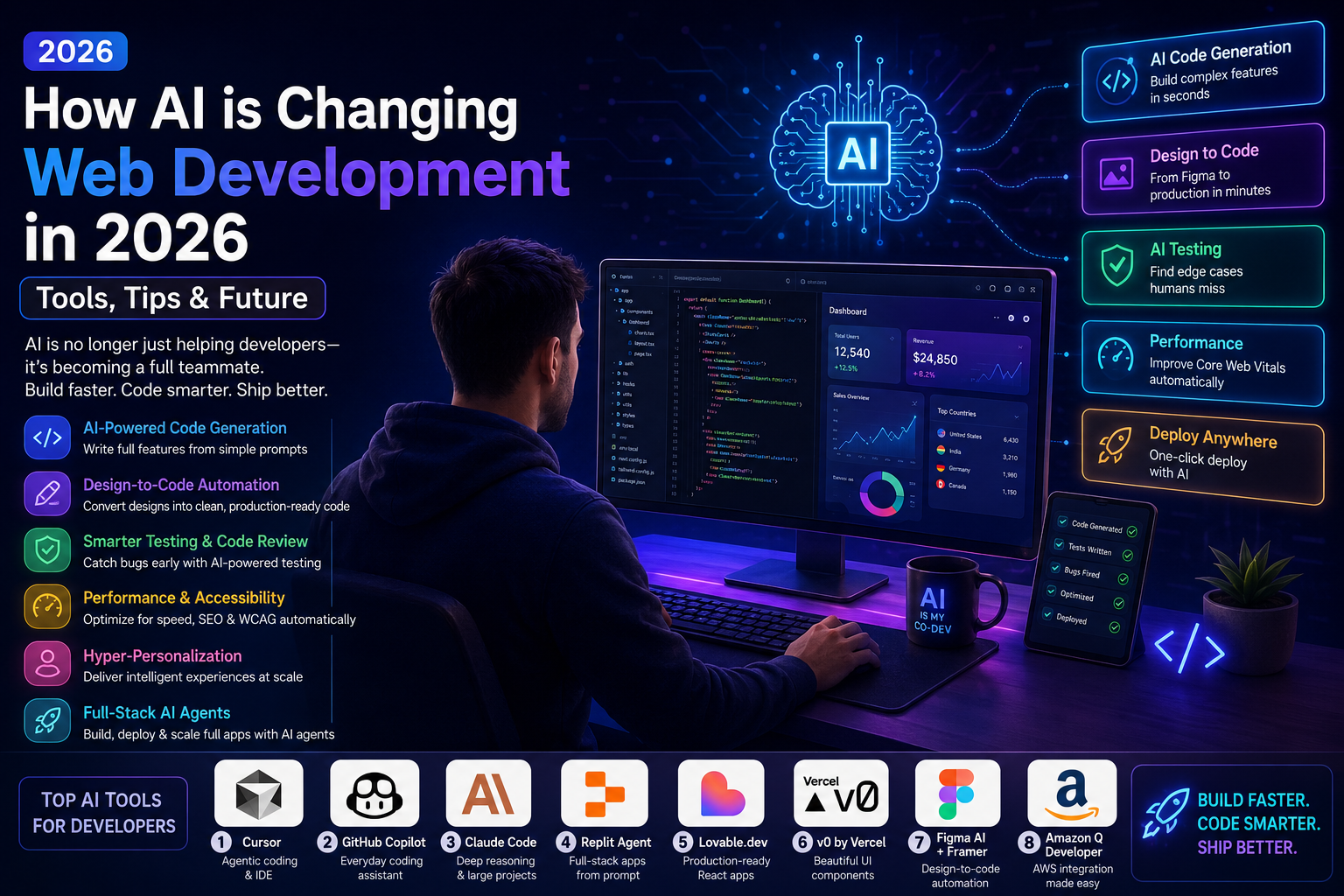
6 Major Ways AI is Transforming Web Development in 2026
1. Intelligent Code Generation & Agentic Workflows
Tools like Cursor, Claude Code, and GitHub Copilot can now understand entire projects and generate complex features from simple prompts.
Example: “Build a responsive dashboard with user authentication, dark mode, and real-time charts using Next.js + Tailwind + Supabase.”
The AI can scaffold the full feature in minutes.
2. Design-to-Code Automation
The gap between designers and developers is shrinking fast.
Tools like Figma AI, Framer AI, v0 by Vercel, and Builder.io can convert Figma designs into clean, production-ready React/Vue/Svelte code with pixel-perfect accuracy.
3. Automated Testing & Code Review
AI now writes test cases, finds edge cases humans miss, and performs code reviews.
Popular tools:
- CodeRabbit
- Greptile
- Cursor Bugbot
This dramatically reduces bugs reaching production.
4. Performance & Accessibility Optimization
AI analyzes websites and automatically suggests (or applies) improvements for:
- Core Web Vitals
- SEO
- Accessibility (WCAG compliance)
- Image optimization
- Lazy loading strategies
5. Hyper-Personalization at Scale
AI enables real-time personalization based on user behavior, location, device, and even mood — without writing complex logic manually.
6. Full-Stack AI Agents
New platforms like Replit Agent, Lovable, and Bolt.new allow you to describe an app in plain English and get a fully working, deployable application (frontend + backend + database + auth) in under an hour.
Top 8 AI Tools for Web Developers in 2026
Here are the most powerful and widely used tools right now:
| Rank | Tool | Best For | Key Strength | Price (approx) |
|---|---|---|---|---|
| 1 | Cursor | Complex projects & agentic coding | Best IDE for large codebases | $20/mo |
| 2 | GitHub Copilot | Everyday coding & enterprise | Most mature + VS Code integration | $10/mo |
| 3 | Claude Code | Deep reasoning & large projects | Best context understanding | Pay-per-use |
| 4 | Replit Agent | Rapid prototyping & full apps | Builds complete apps from prompt | $25/mo |
| 5 | Lovable.dev | Production-ready React apps | Clean code + GitHub sync | Freemium |
| 6 | v0 by Vercel | Beautiful UI components | Stunning shadcn/ui components | Free + Paid |
| 7 | Figma AI + Framer | Design-to-code | Fastest design-to-production | Included in plans |
| 8 | Amazon Q Developer | AWS-based projects | Deep AWS integration | $19/user/mo |
Pro Tip: Most successful teams in 2026 use 2–3 tools together (e.g., Cursor for coding + Figma AI for design + Replit for quick prototypes).
Practical Tips to Use AI Effectively in 2026
- Write Better Prompts Be specific. Instead of “Make a login page”, say: “Create a modern login page with email + Google SSO, password strength indicator, and dark mode using Tailwind and shadcn/ui.”
- Always Review AI-Generated Code AI is fast but not perfect. Treat it as a junior developer — review everything before merging.
- Use AI for Boring Tasks First Start with repetitive work: writing tests, documentation, refactoring, creating API documentation.
- Build in Public with AI Use AI to rapidly prototype ideas and validate them with real users before investing heavily.
- Learn Prompt Engineering The developers who get the best results are those who master prompt engineering + understand the underlying technology.
- Combine AI with Human Creativity Use AI for speed. Use your brain for strategy, user experience, and innovation.
Challenges & Limitations of AI in Web Development
While AI is powerful, it’s not magic:
- Hallucinations — AI sometimes generates incorrect or insecure code
- Context Limitations — Very large or complex legacy codebases can confuse AI
- Security Risks — AI-generated code can introduce vulnerabilities if not reviewed
- Over-reliance — Junior developers may become dependent on AI and stop learning fundamentals
Solution: Always maintain strong code review processes and continue learning core web technologies (HTML, CSS, JavaScript, React/Next.js, etc.).
The Future of AI in Web Development (2027 & Beyond)
Here’s what experts predict for the next 2–3 years:
- AI Agents will handle 60–70% of routine development work
- Voice + Natural Language will become a primary way to build interfaces
- Self-healing websites that automatically fix bugs and optimize themselves
- Hyper-personalized experiences will become the default (not an add-on)
- No-code + AI will blur the line between developers and non-technical founders even more
The developers who will thrive are those who embrace AI as a multiplier rather than seeing it as a threat.